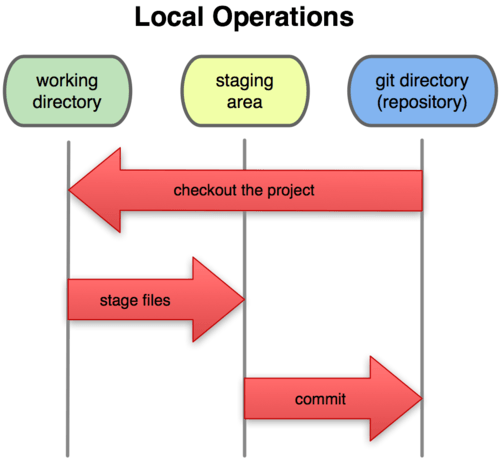
git log : 檢視提交歷史
$ git log commit ca82a6dff817ec66f44342007202690a93763949 Author: Scott Chacon <schacon@gee-mail.com> Date: Mon Mar 17 21:52:11 2008 -0700 changed the version number commit 085bb3bcb608e1e8451d4b2432f8ecbe6306e7e7 Author: Scott Chacon <schacon@gee-mail.com> Date: Sat Mar 15 16:40:33 2008 -0700 removed unnecessary test code commit a11bef06a3f659402fe7563abf99ad00de2209e6 Author: Scott Chacon <schacon@gee-mail.com> Date: Sat Mar 15 10:31:28 2008 -0700 first commit
-p 顯示每次內容的差異
-2 顯示最近的兩次更新
--stat 簡要改行數統計
--pretty=oneline, short, full, fuller
--pretty=format 顯示字定義格式
$ git log --pretty=format:"%h - %an, %ar : %s" ca82a6d - Scott Chacon, 11 months ago : changed the version number 085bb3b - Scott Chacon, 11 months ago : removed unnecessary test code a11bef0 - Scott Chacon, 11 months ago : first commit
选项 说明 %H 提交对象(commit)的完整哈希字串 %h 提交对象的简短哈希字串 %T 树对象(tree)的完整哈希字串 %t 树对象的简短哈希字串 %P 父对象(parent)的完整哈希字串 %p 父对象的简短哈希字串 %an 作者(author)的名字 %ae 作者的电子邮件地址 %ad 作者修订日期(可以用 -date= 选项定制格式) %ar 作者修订日期,按多久以前的方式显示 %cn 提交者(committer)的名字 %ce 提交者的电子邮件地址 %cd 提交日期 %cr 提交日期,按多久以前的方式显示 %s 提交说明
--graph : 顯示結構
选项 说明 -p 按补丁格式显示每个更新之间的差异。 --stat 显示每次更新的文件修改统计信息。 --shortstat 只显示 --stat 中最后的行数修改添加移除统计。 --name-only 仅在提交信息后显示已修改的文件清单。 --name-status 显示新增、修改、删除的文件清单。 --abbrev-commit 仅显示 SHA-1 的前几个字符,而非所有的 40 个字符。 --relative-date 使用较短的相对时间显示(比如,“2 weeks ago”)。 --graph 显示 ASCII 图形表示的分支合并历史。 --pretty 使用其他格式显示历史提交信息。可用的选项包括 oneline,short,full,fuller 和 format(后跟指定格式)。
-(n) 仅显示最近的 n 条提交 --since, --after 仅显示指定时间之后的提交。 --until, --before 仅显示指定时间之前的提交。 --author 仅显示指定作者相关的提交。 --committer 仅显示指定提交者相关的提交。
2008 年 10 月期間,Junio Hamano 提交的但未合併的測試腳本(位於項目的 t/ 目錄下的文件),可以用下面的查詢命令:
$ git log --pretty="%h - %s" --author=gitster --since="2008-10-01" \ --before="2008-11-01" --no-merges -- t/ 5610e3b - Fix testcase failure when extended attribute acd3b9e - Enhance hold_lock_file_for_{update,append}() f563754 - demonstrate breakage of detached checkout wi d1a43f2 - reset --hard/read-tree --reset -u: remove un 51a94af - Fix "checkout --track -b newbranch" on detac b0ad11e - pull: allow "git pull origin $something:$cur
git clone : 獲取原始碼
git commit --amend : 取消commit
git reset HEAD <file> : 取消暫存的檔案
git add : 更新內容到暫存區
git checkout -- <file> : 取消修改內容回到上一次的修改
記住當使用了此指令,將會把之前的修改一併還原
$ git checkout -- benchmarks.rb $ git status # On branch master # Changes to be committed: # (use "git reset HEAD <file>..." to unstage) # # modified: README.txt
2.5 Git 基礎 - 遠程倉庫的使用
git remote : 列出每個倉庫的名子
-v :顯示相對應的克隆庫
git remote add [shortname] [url] :
git fetch [remote-name]
git pull
git push
git remote show
git remote rename
git remote rm
2.6 Git 基礎 - 打標籤
git tag -a -m
git tag -s -m
git tag -v
git push --tags
2.7 Git 基礎 - 技巧和竅門
設置別名
$ git config --global alias.co checkout $ git config --global alias.br branch $ git config --global alias.ci commit $ git config --global alias.st status
設以後輸入git connit只要鍵入
git ci
輸入外部命令
$ git config --global alias.visual "!gitk"
copyright : http://git-scm.com/

沒有留言:
張貼留言